The Public Administrator’s Playbook for Driving Operational Efficiency

Public sector agencies are under immense pressure to do more with less. City managers, department directors, and finance leaders face tightening budgets, increasing audit scrutiny, and rising citizen expectations for fast, effective service delivery.
Operational efficiency is no longer optional — it’s foundational. Yet many modernization efforts stall under the weight of legacy systems, rigid ERP modules, or sprawling spreadsheets that were never designed to support multi-department coordination.
The good news? Improving operational efficiency does not require a multi-year overhaul. By centralizing asset visibility, automating workflows, and equipping field teams with mobile tools, agencies can begin seeing measurable improvements in weeks — not years.
This guide explores how flexible, no-code asset management systems help public sector organizations eliminate bottlenecks, improve accountability, and operate with greater transparency across departments.
Where Inefficiency Hides: Identifying Common Bottlenecks
Public agencies operate across multiple departments, each with distinct operational responsibilities:
- Public Works
- Law Enforcement
- Fire & EMS
- Parks & Recreation
- Facilities
- IT
- Finance
While their missions differ, they share a common challenge: managing a wide range of physical assets, equipment, vehicles, technology, and consumables necessary to serve the public effectively.
Many government agencies still rely on processes and technologies that belong in the past, leading to unnecessary delays, waste, and frustration. Here are some of the most common bottlenecks sapping efficiency in state and local governments:
- Leadership lacks real-time visibility into their full asset inventory
- Inventory levels are unclear or inconsistently updated
- Equipment may be misplaced or duplicated across departments
- Manual reconciliation consumes staff time
- Audit exposure increases due to incomplete documentation
Operational inefficiency is rarely caused by lack of effort — it is caused by fragmented systems. When information lives in multiple formats across multiple departments, coordination becomes reactive. Leaders cannot easily answer simple questions such as: “Who has this asset?” “Is it in service?” or “When was it last inspected?” Without centralized visibility, decision-making slows and risk increases.
How Spreadsheets Slow Down Government Operations
Spreadsheets are often the starting point for asset tracking. They're familiar, flexible, and inexpensive. But as agencies or inventories grow in size, spreadsheets quickly reach their limits, posing limitations such as:
- Constant manual and error-prone updates
- No immutable audit trail of changes
- Lack of multi-user collaboration
- Inability to automate workflows, alerts, or approvals
As asset counts exceed 500 items, maintaining spreadsheets becomes an administrative burden. Different departments may be updating different versions of the same file, making it difficult to maintain asset visibility. Come audit time, staff members are stuck with the time-consuming task of manually reconstructing asset histories or reconciling discrepancies.
Why ERP Systems Alone Are Not Enough
ERP systems play a critical role in government finance and accounting. They are essential for depreciation reporting, budget alignment, and compliance with state mandates.
Whereas spreadsheets as a whole are not an ideal asset management solution, ERP systems primarily focus on financial visibility and need to be supplemented for comprehensive asset lifecycle tracking. ERP asset modules often:
- Lack detailed day-to-day tracking of asset assignments
- Do not support structured check-in/check-out workflows
- Provide limited inventory threshold monitoring
- Offer minimal chain-of-custody tracking
- Lack intuitive mobile interfaces for field use
As a result, operational teams frequently rely on separate tools to manage inspections, assignments, maintenance schedules, and inventory levels. This creates parallel systems and duplicate work.
Modern asset management platforms complement ERP systems by serving as the operational layer. Financial data can sync to support reporting requirements, while departments manage real-time assignments, maintenance workflows, and inventory controls in a purpose-built environment. The result is tighter alignment between operational execution and financial reporting.
The Core Drivers of Operational Efficiency in Government Agencies
Improving public sector operational efficiency requires more than digitizing forms. It requires strengthening visibility, accountability, and automation across departments.
Here are five key drivers that consistently improve performance.
1. Centralized Asset Visibility
Without a single system of record, agencies cannot confidently track the full lifecycle of their resources. A centralized platform provides structured visibility for:
- Vehicles
- Radios
- Firearms
- Tools
- Facilities equipment
- Technology
- Consumables
When asset data is unified, duplication decreases, idle equipment is identified, and procurement decisions become data-driven rather than reactive. Leadership gains a comprehensive, real-time view of resources across departments — improving both budgeting accuracy and strategic planning.
2. Structured Chain-of-Custody Accountability
Many public sector assets are high-value or high-risk. Clear assignment tracking is not just operationally helpful; it is legally and administratively essential.
Examples of high risk and value assets include:
- Law enforcement firearms
- Body cameras
- Radios
- Emergency response tools
- Fleet vehicles
Without structured check-in and check-out workflows, agencies risk liability exposure, inventory discrepancies, and audit findings.
Modern platforms create systematic accountability through:
- Time-stamped assignment logs
- Personnel-level tracking
- Status history documentation
- Role-based access permissions
Instead of relying on manual signatures or informal processes, assignment and return histories are documented automatically. This strengthens transparency and reduces compliance risk.
3. Inventory & Consumables Management
Consumables often receive less oversight than capital assets, yet shortages can severely disrupt operations. Agencies routinely manage bulk items like:
- Medical supplies
- Emergency gear
- Office supplies
- Maintenance materials
Operational efficiency requires more than periodic counts. When inventory levels available in real time and alerts are automated, agencies avoid last-minute purchasing and operational delays. Proactive inventory management reduces waste, supports budget forecasting, and ensures teams have what they need to perform their duties.
4. Preventive Maintenance Scheduling
Unplanned downtime disrupts public services and increases costs. Preventive maintenance programs protect both budgets and operational continuity.
Public agencies must routinely schedule:
- Fleet maintenance
- Equipment inspections
- Certification renewals
- Safety checks
- Warranty tracking
Manual tracking of maintenance intervals often leads to missed deadlines or reactive repairs. Automated reminders and recurring workflows ensure inspections and servicing occur on schedule. Maintenance history becomes centralized and searchable. Over time, this structured approach extends asset lifespan and reduces emergency repair costs.
5. Department-Level Autonomy with Enterprise Oversight
Government organizations operate within structured hierarchies:
System → Department → Division → Location → Asset
Each department requires autonomy to manage daily operations. At the same time, finance and executive leadership require enterprise-wide oversight.
Modern asset management platforms support both needs by enabling:
- Department-specific dashboards
- Segmented visibility controls
- Cross-department reporting
- Enterprise-wide roll-up summaries
This balance improves coordination without overcomplicating workflows. Departments manage what they need, while leadership maintains strategic visibility.
The No-Code Advantage: Build the Solutions You Need
Government operations and compliance requirements are regularly evolving. For public sector leaders striving for consistent operational efficiency, a no-code asset management system is a game-changer. Why? Because it puts the power to innovate directly in your hands. Instead of being locked into a vendor’s rigid software or waiting months (or years) for IT to deliver a new system, your team can configure the solutions you need, when you need them.
What is no-code? In simple terms, no-code platforms provide an intuitive, drag-and-drop environment to build apps, forms, and automated workflows. They take away the technical complexity (like coding, servers, and integration setup) so that non-developers, such as your analysts or operations staff, can create software solutions using visual tools.
The benefits of no-code platforms for government agencies are multifold:
- Rapid Time-to-Value: No-code greatly accelerates development cycles. Agencies can go from idea to functional application in a fraction of the time of traditional development. Instead of a year-long project, a solution might be built in a few weeks or even days. For government teams, that agility can translate to meeting a new mandate or emergency requirement on time, instead of missing the window due to lengthy IT lead times.
- Seamless Collaboration: No-code platforms enable the people who understand the work best to drive the solution. Your operations managers, field supervisors, or analysts are the ones who know exactly where the bottlenecks are and what a better process should look like. With no-code, these staff can directly configure the software to fit your processes without specialized programmers.
- Customizable Fields and Processes: Government operations are highly diverse – what works for one city or department might not fit another. No-code platforms recognize that one size does not fit all, which is why they're designed to be highly customizable. When your software bends to your way of working (and not vice versa), efficiency soars.
- Lower Cost and Risk: Building or buying traditional software can be prohibitively expensive for local governments. No-code solutions are typically offered as cloud-based platforms with subscription models, which significantly lowers upfront costs. Moreover, because development is faster and done in-house by your team, you spend less on external IT consultants. Maintenance and updates are handled by the platform vendor, reducing strain on your IT staff.
- Compliance and Security Built-In: A common concern with empowering more staff to build tools is whether those tools will be secure and compliant. Reputable no-code platforms like Asset Panda address this by providing governance features and IT oversight. The platform itself handles security, user permissions, data encryption, and audit logs centrally, so anything you build on it automatically adheres to those standards.
By leveraging no-code, agencies large and small are already seeing dramatic improvements in public sector operational efficiency. However, flexible solutions are just one piece of the puzzle – let's examine how mobile-first technology can help your team further save time and boost productivity.
Unleashing Your Field Teams with Mobile-First Technology
Much of the public sector’s work doesn’t happen behind a desk – it happens out in the field. Whether it’s city inspectors examining buildings, public works crews maintaining infrastructure, or social workers meeting clients, a variety of government employees spend their days on the move.
To maximize public sector operational efficiency, these field teams need tools that move with them. Relying on office-bound technology or paper-based processes in the field isn’t just inconvenient; it severely limits productivity and responsiveness. Here's how mobile-first technology can unleash your field workers’ full potential and bridge the gap between the field and the office.
The Freedom to Work Anywhere
Mobile-first solutions ensure that employees can complete critical tasks on the go, without detouring back to the office or delaying updates until end-of-day. Imagine a code enforcement officer who spends all day driving from site to site – if her workflow is tied to a desktop application, she won’t be able to update the system until hours later, likely relying on handwritten notes or memory. This not only creates lost time but also an opportunity for errors. But with a robust mobile app on a tablet or smartphone, she can file reports, capture photos, fill out checklists, and submit results all from the field, in real time. Bonus points if the mobile app includes an offline mode, so she can continue accessing records even without cell service or WiFi.
By equipping field employees with mobile access, agencies allow work to happen at the point of service, dramatically speeding up processes. The result is more inspections completed per day, faster repairs, and issues resolved on the first visit.
Real-Time Data and Collaboration
Mobile technology isn’t just about convenience; it fundamentally improves how information flows through the organization. A modern mobile-first platform will sync data to the cloud, meaning that updates are visible to everyone in real time. For example, when a maintenance technician marks a repair job as complete using a mobile app, the central office can see that status update immediately – no phone calls or emails needed. This real-time visibility eliminates the lag that used to plague field operations.
Streamlined Workflows
Going mobile also creates opportunities to streamline and automate formerly slow, manual processes in the field. For instance, dispatching and scheduling can be optimized: supervisors can assign tasks dynamically to inspectors or crews based on real-time location and availability, often through an app, rather than preparing paper schedules a day prior. Field staff, in turn, can pull up all relevant records or guidance on their device. If a health inspector needs to review a restaurant’s history or a building code during an inspection, they can retrieve it on the spot instead of carrying thick binders or calling the office. Being able to access the right information and update records from anywhere provides a significant boost in efficiency: more tasks handled per day, fewer errors from transcription, and faster response times to issues.
Enhanced Service and Accountability
When field teams are empowered with mobile technology, the benefits extend to the public as well. Citizens get results faster when teams receive work orders directly on their mobile devices, enabling quick response times. There’s also greater accountability: mobile apps often capture metadata like timestamps, GPS location, and even digital signatures. So, if a job was marked complete, you have evidence of when and where, which helps build public trust in the work being done. A mobile-first approach not only increases internal efficiency but also contributes to a more responsive, service-oriented government.
Feature Deep Dive: The Engine of a Modern Operation
With a clear picture of how no-code, mobile-first solutions benefit your public sector agency, you’re likely wondering where to begin your search for the right platform. Fortunately, Asset Panda offers all the features you need to effectively support your agency’s workflows and serve your constituents. Whether you’re a City Manager or a Public Works Supervisor, here are 4 key ways Asset Panda can streamline your office’s efficiency.
Custom Actions & Automated Workflows
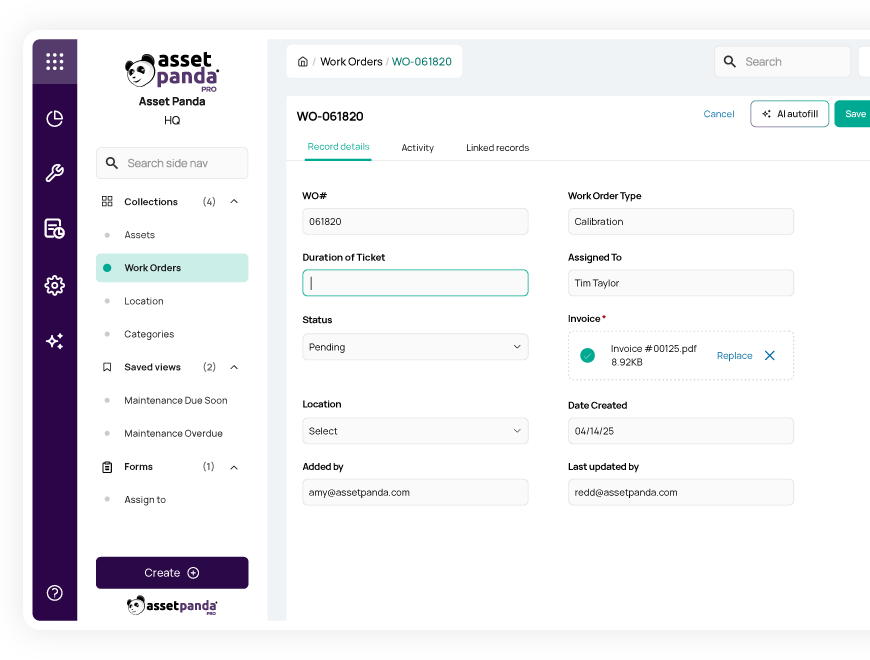
In Asset Panda’s intuitive, no-code environment, anyone on your team can seamlessly customize workflows to match your exact needs. From IT check-in and check-out actions to inspection checklists, you can configure Asset Panda to match all your specific asset fields and workflow requirements to ensure clear and compliant records. Supervisors can manually assign tasks to employees as they arise or use conditional automations to schedule workflows based on certain triggers (e.g., scheduling heavy equipment inspection every 3 months or assigning a work order when a service request is submitted).
Automated Depreciation
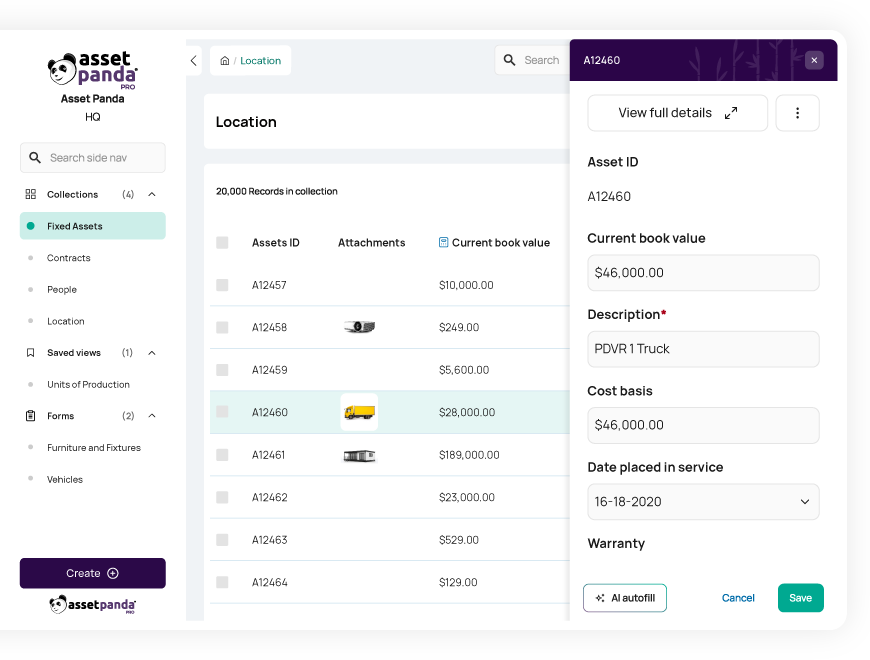
From vehicles to computers, the majority of your fixed assets have what’s called a useful life. Throughout each item’s useful life, it depreciates in value and, in turn, lowers your tax liability and insurance premiums. Properly tracking depreciation is vital to avoid spending more than necessary on taxes and insurance and ensures that your records paint an accurate financial picture. Clear financial reporting is essential for any government organization to prove grant compliance and secure necessary funds in the future.
Solutions like Asset Panda not only enable you to easily track the full lifecycle of your assets but also automatically calculate their depreciation using your chosen method. Whether you use the classic straight-line method, accelerated options like declining or double-declining balance, or usage-based methods like units of production, Asset Panda’s got you covered. Set your automated depreciation reports to your desired schedule as well, such as monthly, quarterly, or annually.
Companion Mobile App with Offline Mode
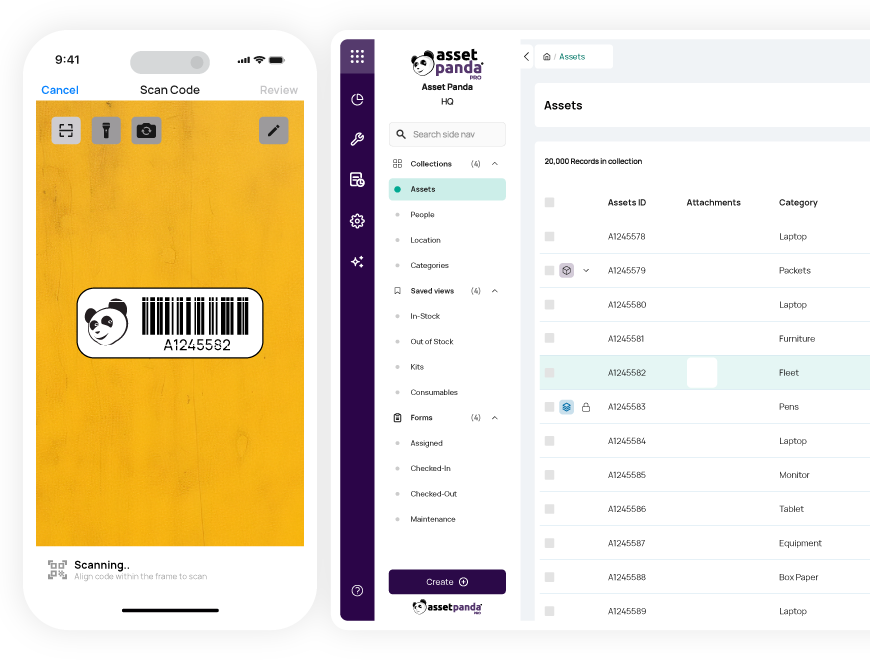
Asset Panda not only offers a mobile solution, but a powerful companion app with the same UX as the desktop platform. This makes switching between your computer and your phone a seamless process as you don’t have to re-learn where everything is. With built-in barcode scanning, your field employees can find or update asset records using a single scan, ensuring time savings and data accuracy. Plus, our available offline mode allows you to continue accessing asset records even when you don’t have access to cell service or WiFi. When field workers are back in network, their offline updates will automatically sync to Asset Panda.
Automated Reporting
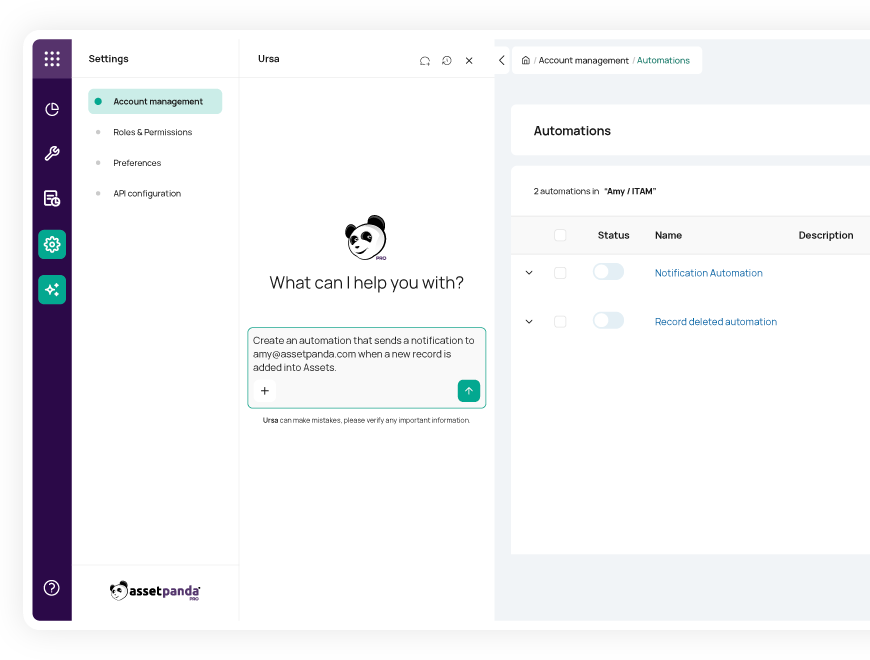
For public sector organizations, we know how important reporting is for financial and compliance purposes. That’s why Asset Panda makes it simple to customize and automate reports, so you can routinely review the metrics that matter most to you. Build visual dashboards based on your custom fields and set schedules (e.g., weekly, monthly, or quarterly) to have reports sent directly to your inbox.
Rapid Time-to-Value & Cloud Hosting
Implementing more efficient processes shouldn’t be a hassle upfront. Asset Panda’s cloud-based platform automatically eliminates the time-consuming and costly implementation associated with on-premise solutions. With the ability to create and customize your no-code program quickly, your agency will realize fast time to value.
Real-World Department Applications
Modern asset management supports operational efficiency across diverse public sector environments. Here are several examples of how different agencies can streamline operations with a no-code platform.
Law Enforcement
Officers can be assigned firearms, radios, and body cameras with documented tracking. Expiration dates and maintenance logs are centrally recorded, reducing risk and improving readiness.
Fire & Emergency Services
Departments track inspection schedules, certification renewals, and apparatus maintenance. Equipment assignments to stations remain visible and auditable.
Public Works
Fleet vehicles, heavy equipment, and tools are monitored for usage and preventive maintenance. Repair history is centralized, supporting budgeting and lifecycle planning.
Facilities
HVAC systems, infrastructure components, and building equipment are tracked by location. Preventive maintenance workflows ensure compliance and reduce downtime.
Building the Business Case: The Real ROI of No-Code Modernization
While the benefits of no-code and mobile solutions for public sector agencies are clear, procuring new software on a fixed budget is easier said than done. When proposing any new technology, leadership needs more than enthusiasm – they need data-backed reasons to invest.
With no-code platforms like Asset Panda, the ROI is both measurable and compelling, particularly for public sector agencies seeking operational efficiency without ballooning budgets. Here's how to present a clear case to financial decision makers.
Hard Savings
No-code solutions provide quantifiable savings that will be reflected on your balance sheet, such as:
- Minimized Asset Loss: A configurable asset tracking system helps reduce misplaced or stolen equipment by creating real-time visibility and automated audit trails. For one state agency, digitizing asset check-ins and maintenance logs helped recover thousands in unaccounted inventory within months.
- Lower Fuel Costs from Optimized Routes: With mobile-first, location-aware work order assignments, field teams can be routed more efficiently, saving fuel and reducing wear-and-tear on vehicles. This translates to direct savings in fleet management budgets.
- Elimination of Paper and Printing Costs: Transitioning to digital forms and workflows eliminates the need for printing thousands of documents annually, saving money on paper, ink, storage, and the labor costs of filing and scanning.
Soft Savings
These savings might not appear on an invoice but have a profound impact on efficiency and public service quality:
- Reclaimed Administrative Hours: Automating approvals, notifications, and reporting allows staff to shift time from repetitive admin tasks to more strategic or citizen-facing work. This boosts morale and efficiency.
- Increased Jobs Completed Per Day: Field teams using mobile apps can complete inspections, repairs, or service calls faster thanks to instant access to task details, maps, and reporting tools, increasing daily task completion.
- Improved Data Accuracy: Digital forms with required fields and dropdowns reduce human error. The result is cleaner data for compliance reporting, audits, and decision-making—reducing rework and increasing confidence in reports.
- Faster Decision-Making: Real-time dashboards and automated reports give leadership immediate insight into operations, enabling quicker responses to issues and more informed planning.
By capturing both cost savings and performance improvements, no-code technology offers a compelling case for strategic investment by allowing agencies to modernize quickly and sustainably. Asset Panda’s no-code, mobile-first platform is no exception, empowering all kinds of public sector organizations to streamline their asset tracking and save time and money.
Ready to digitize your first workflow? See for yourself how easy it is to replace an inefficient paper process with Asset Panda’s modern, no-code solution. Schedule a meeting with your solution specialist to see exactly how Asset Panda can be tailored to boost your agency’s operational efficiency.
Additional resources to help you modernize operations



Learn more from a solution specialist
Schedule a demo to find out how you can transform your workflows with Asset Panda Pro
Contact our team at (888) 928-6112
