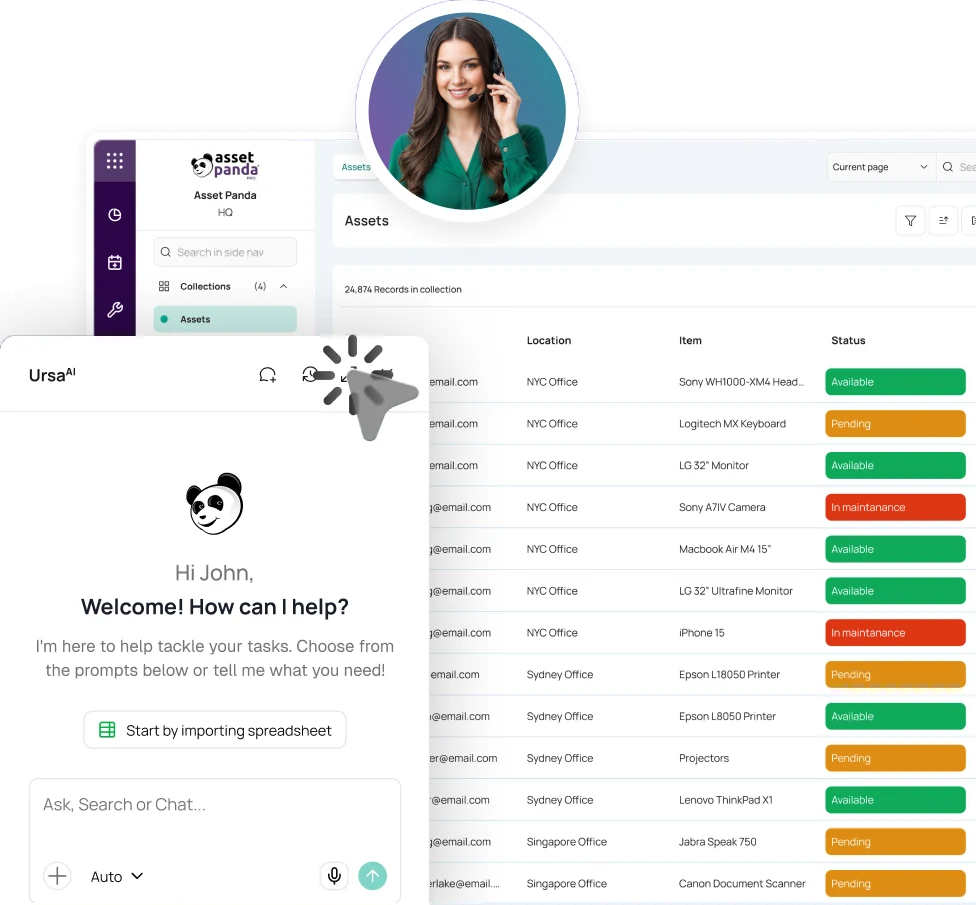
MULTI-ACCOUNT IT OPERATIONS, ONE ACCOUNTABLE RECORD
IT Asset Management Software for MSPs
Asset Panda organizes devices, assignments, inventory, tickets, audits, and lifecycle activity by account so MSPs can manage multiple environments without mixing ownership or service details.


Trusted by IT service providers and technology teams




BUILT FOR THE WAY MSPS DELIVER SERVICE
Start with the operating model you support.
 Full-Service MSPs
Manage devices, assignments, requests, warranties, repairs, inventory, audits, and lifecycle activity within separate accounts.
 Co-Managed IT
Coordinate technicians and in-house IT teams while preserving clear accountability for shared devices, assignments, and service work.
 Device Lifecycle & Deployment Services
Track intake, staging, kitting, assignment, shipping, returns, repairs, redeployment, and disposition without rebuilding the details at every handoff.
 Vertical-Focused MSPs
Support organizations with stricter documentation, audit, security, or access requirements while keeping each portfolio separate and reportable.

Make the asset record the handoff between systems.
Asset Panda connects devices, assignments, tickets, documents, audits, and lifecycle activity in one operational system while keeping each portfolio separate and leaving specialized tools in place.
Know what each account has, who has it, and what needs attention.
Tie custody to the right account and user
Assign devices to users, technicians, locations, or storage. Preserve checkout, return, transfer, and offboarding activity as devices change hands.
Explore IT Asset ManagementTrack inventory by account
Manage devices, network equipment, spares, accessories, and kits by account and location, with issue, return, and reorder activity.
Explore Inventory ManagementConnect requests to the device
Ursa Help Desk Agent can answer routine questions, run approved skills, or escalate work while keeping the requester, device, priority, and service context connected.
Explore Help Desk TicketingManage the full device lifecycle
Tie purchase, warranty, assignment, repair, return, refresh, redeployment, and disposition details to the right device and account.
Explore Asset Lifecycle ManagementAudit devices in the field
Scan expected devices by site, identify missing or unexpected devices, and continue supported work offline after downloading the needed data.
Explore Mobile Asset AuditingStandardize reporting and follow-up
Use saved views, scheduled reports, alerts, required fields, signatures, and automations to standardize recurring work without custom development.
Explore Asset ManagementAdd ITAM to your managed services
Expand your offering with Asset Panda ITAM and create another way to serve customers as your portfolio grows.

POWERED BY THE ASSET PANDA INTELLIGENCE PLATFORM
Find the answer without digging through disconnected systems.
Asset Panda connects devices, people, locations, tickets, documents, assignments, audits, and lifecycle context in one platform. UrsaAI helps authorized users find answers from Asset Panda data and approved company knowledge, surface gaps, and move the right work forward.

EXTEND THE SYSTEMS YOUR MSP ALREADY RUNS
Connect asset data without replacing endpoint, PSA, ITSM, or identity tools.
Use supported integrations for endpoint management, identity, IT service management, warranty, and collaboration. Examples include Microsoft Intune, Jamf Pro, Kandji, Hexnode, Apple Business Manager, Microsoft Entra ID, Google Workspace, Okta, ConnectWise, ServiceNow, Freshservice, Jira, Zendesk, and Lenovo warranty data.



SEPARATE CUSTOMER PORTFOLIOS. CONTROL WHO CAN SEE WHAT.
Structure customer accounts separately, then control access by role.
Separate accounts and controlled access
Organize customer portfolios in separate accounts and use roles and permissions to control visibility. MSP teams can work within the accounts they support, and MSPs that choose to offer customer access can limit users to authorized information.
Explore IT Asset ManagementSecurity and audit support
SOC 2 Type II controls, GovRAMP Authorized status, HIPAA-compliant operations, encryption at rest and in transit, AWS hosting, SSO options, and an activity trail help MSPs support varied security requirements.
View Security InformationPROVEN IN IT SERVICES
Proof that speaks to field visibility, less manual tracking, and better service.

Daily time savings for IT operations
“Time saved since implementation: approximately 1 hour a day.”
Controller, My IT


Less manual tracking every week
“Now we got that down to 30 minutes to one hour per week.”
Senior Accountant, LogicForce

Faster reporting with better detail
“Getting more detailed, better reports is also faster.”
Desktop Support, eXcell








MSP Asset Management FAQ
What is IT asset management software for MSPs?
IT asset management for MSPs is the process of tracking and managing IT assets across multiple customer environments while keeping each account’s devices, users, access, service activity, and reporting separate. Asset Panda links that information to inventory, tickets, audits, documents, and lifecycle activity.
How is MSP IT asset management different from general ITAM?
General ITAM often manages one organization’s devices. MSP ITAM must support multiple portfolios, account separation, access controls, reporting, and service workflows without mixing data.
Does Asset Panda support multi-client or multi-tenant ITAM and customer access?
Yes. Asset Panda can separate customer portfolios into individual accounts under one organization and use roles and permissions to restrict access. MSPs that choose to offer customer access can limit users to the appropriate account and authorized information.
Does Asset Panda replace our PSA, MDM, ITSM, or identity tools?
No. Asset Panda can serve as the operational asset system alongside specialized tools. Supported integrations include ConnectWise, Intune, Jamf Pro, ServiceNow, Freshservice, Jira, Entra ID, Okta, and Google Workspace.
Can Asset Panda support the full IT asset lifecycle for MSPs?
Yes. Track acquisition, assignment, warranty, repairs, refresh, return, redeployment, and disposition for each account from one connected lifecycle view.
Can Asset Panda handle MSP inventory management across accounts?
Yes. Track serialized devices, accessories, kits, spares, and quantity-based inventory by account and location, with issue, return, and stock visibility.
Can technicians work on-site without connectivity?
Yes. Download the needed data before entering a low-connectivity area, then make supported updates offline and sync after reconnecting.
SEE ASSET PANDA IN YOUR MSP OPERATIONS
See it mapped around your accounts, devices, tickets, and service workflows
We'll show you how Asset Panda separates portfolios, connects devices to ticket activity, and puts lifecycle details within reach for technicians and authorized users.
Free Demo