


Reservations Management Software
Stay on track with seamless reservation management
Save time and boost efficiency with our easy-to-use asset and facility reservation software.
(No Credit Card Required)
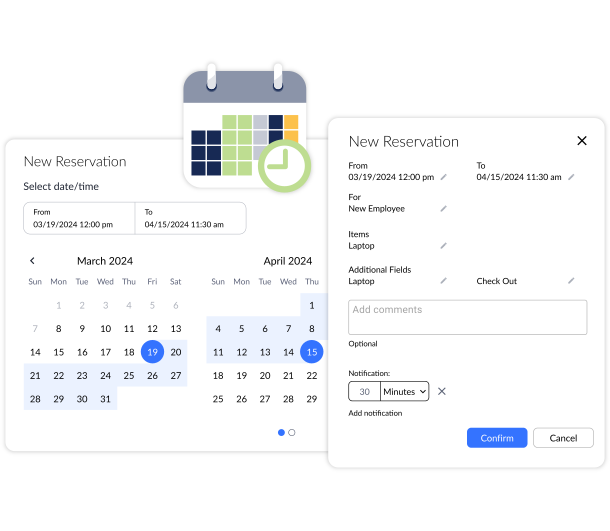
Get full visibility into your reservations
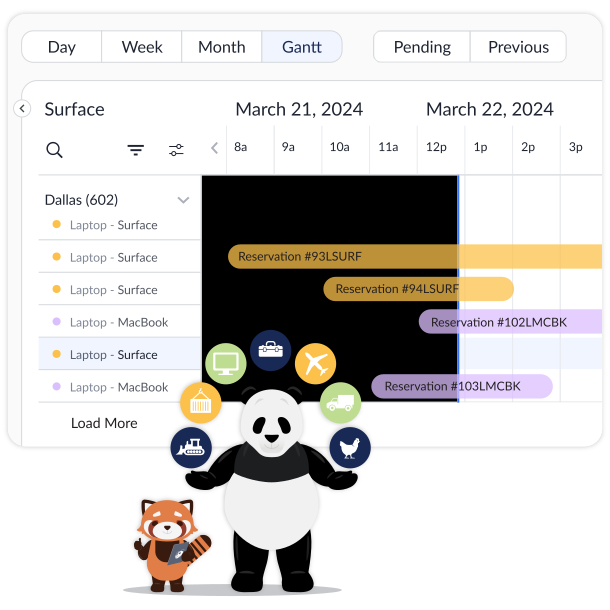
Visualize your reservations in a modern Gantt chart
Whether you’re reserving meeting rooms, IT devices, or construction equipment, Asset Panda makes it easy to get a bird’s eye view of all your current and upcoming reservations. Visualize everything in a convenient Gantt chart to understand usage patterns and optimize future resource allocation. From various office locations to remote employees, our clear reservation management dashboard helps you ensure on-time delivery of reserved assets and reduce downtime.
Plan ahead with confidence
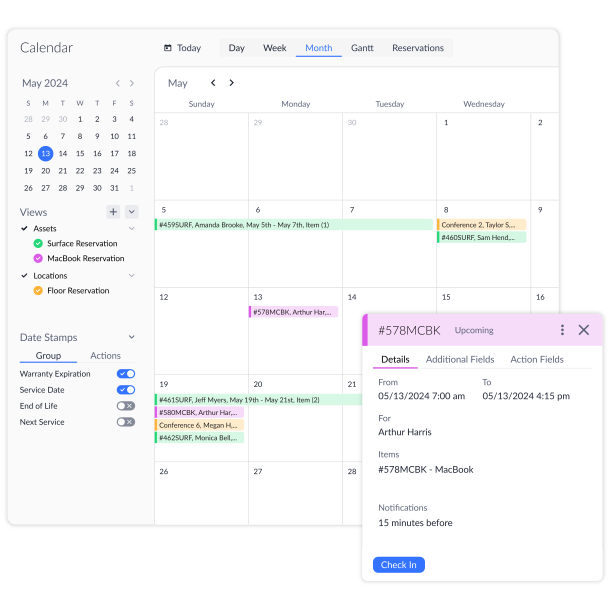
Improve resource allocation with clear reservation hold times
Prevent double-booking and overbooking with full visibility into your asset inventory and reservations. Select which items and locations are reservable and how long they can be put on hold with our comprehensive reservation management system. With clear reservation hold times, you can ensure the assets or facilities your team needs will be available for future bookings.
Streamline everyday workflows
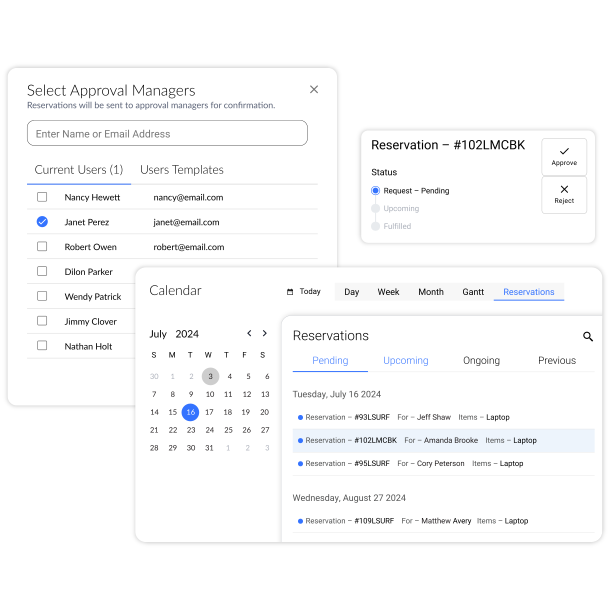
Enable your team to request reservations and assign approval managers
Save time and increase efficiency by empowering your team to request assets and meeting rooms directly in Asset Panda. Designate additional approval managers in our reservation management software to lighten your workload and streamline processes.

Unlimited Users
Get your entire team on the same page and assign custom user permissions.

Fast Time to Value
Achieve high ROI and user adoption with our intuitive interface.

Reservation Dashboard
Visualize all your reservations in a calendar or Gantt chart.
Useful features for reservation management

Asset assignment

Check-out and returns

Built-in barcode technology

Full lifecycle history

Asset kitting

Compliance tracking

Signature capture

Ticketing/work orders

Contract management

Service contract tracking

Record-level attachments

Straight line depreciation

Asset listing view

Notifications

Robust reports

Custom fields

Action-based forms

Configurable audits

Calculation fields

Field requirements

iOS and Android Compatible

Full integration with web app

Built-in barcode scanning

GPS pindrop

Mobile actions

Reporting access

Quick asset addition

Audit setup and execution

User specific views

Sortable columns

Built-in search

Mobile and web apps

Data import

Easy record replication
Unlimited users

Bulk asset reallocation

SOC 2 certified

Amazon AWS hosting

TLS 1.2 Encryption

Robust roles and permissions
Related reservation resources



Frequently asked questions
How can I track which assets are currently reserved and avoid double-booking or scheduling conflicts?
Asset Panda helps track reserved assets using its Reservations feature, which includes a calendar-style view of asset availability. Each reservation records a start and end date and is visible directly on the asset record and in the calendar, making it easy to see when an item is already booked. This visual scheduling approach allows teams to quickly identify conflicts and avoid double-booking by checking availability before assigning or reserving equipment.
How do I set up a specific workflow to require a vehicle safety inspection before a reserved vehicle is checked out?
Asset Panda supports inspection-before-use workflows by combining asset status controls, custom forms, and visibility rules. You can require users to complete a Vehicle Safety Inspection form that updates the vehicle’s Status to “Approved for Use.” The vehicle check-out form can then be configured to appear only when the asset is in that approved status. If the inspection fails, the status remains “Out of Service,” preventing checkout. All inspections and check-outs are logged in the Activity Stream, providing clear accountability without relying on rigid workflow automation.
Can users be restricted to only reserving assets from their own department or location?
Yes. Asset Panda can restrict users to reserving only assets from their own department or location by using Limited Record Visibility or User Templates with filters. Administrators configure visibility rules so users only see asset records assigned to their department or location. Because reservations are created from the assets a user can see, this automatically limits their ability to reserve equipment outside their authorized area, while role-based permissions control what reservation actions they are allowed to perform.
Can I automate a confirmation email or PDF receipt for a reservation that can be signed by the user?
Asset Panda can automate reservation confirmation emails using Automations that send notifications when a reservation is created or updated. While the system does not automatically generate PDF receipts, you can require a digital signature on a checkout or confirmation form that the user completes when picking up the reserved asset. That signed form is stored with the asset record and can be viewed or manually exported as a PDF if a printable record is needed.
How can I create an automated alert to notify staff that a reserved item is low in stock or due for maintenance before the reservation date?
You can do this with custom fields and Scheduled Automations. Track maintenance readiness using fields like “Next Service Date” and “Status,” and track stock using fields like “Quantity Available” and “Reorder Point.” Then configure a Scheduled Automation to run daily and alert staff when a reserved item is approaching its reservation date but is flagged as “Under Maintenance,” overdue for service, or below its reorder threshold. This gives your team time to service the item or replenish inventory before the reservation begins.
How can I ensure a reservation workflow includes mandatory compliance forms or liability waivers?
Asset Panda supports compliance and liability documentation by using required sign-off forms alongside the reservation process. You can create a Compliance or Liability Waiver form with a required Signature field and configure your workflow so users must complete this form—typically at checkout or asset pickup—before the asset’s status is updated to “In Use.” Administrators can control form visibility based on asset status to ensure equipment is not released until the required documentation is completed. All signed forms are stored with the asset record and logged in the Activity Stream for audit purposes.

See how Asset Panda can work for you
Schedule a free demo to see how our fixed asset management software can transform how you work.
Contact our Sales Team at (888) 928-6112