
What is Single Sign-On (SSO) & How Does Asset Panda Work with OneLogin?
Blog

Table of Contents
Take Control of Your Assets
A personalized demo is just one click away.
In today’s digital world, organizations use numerous platforms every day to perform their business operations. The more applications an employee needs to log into, the more usernames and passwords they need to keep track of. Single sign-on (SSO) is one solution that helps businesses avoid weak or repeated passwords and, in turn, increase security. So, exactly what is SSO and how does SSO login work?
Here’s a guide that explains exactly what we mean when we say, “SSO,” and how you can seamlessly implement it in Asset Panda.
What is SSO?
Single sign-on, also known as SSO, is a form of security that allows a user or series of users to securely sign in to multiple websites, platforms, and applications with a single, unified username/password combination. Essentially, think of single sign-on as a master key that will get you into any of the secure locations you use on a regular basis.
We know what you’re thinking — isn’t it a little dangerous having one password for all of your accounts? In fact, single sign-on actually increases security while also boosting convenience and saving organizations time and money along the way.
How Does SSO Increase Security?
By eliminating the need for numerous usernames and passwords, SSO cuts down on the number of potential access points for hackers. Identity providers typically require strong master passwords or passphrases, along with multi-factor authentication (MFA) to further protect against unauthorized access.
How Does SSO Login Work?
Single sign-on works through a partnership between the SSO provider and the service provider, or whichever website, platform, or application a user is trying to access. While the process of configuring SSO can vary between identity providers and integration methods, here’s how it typically looks step by step.
First, a user navigates to and arrives at the website, software application, or other digital destination that requires secure access. Then, the service provider — whoever owns the website or application — sends a token to the single sign-on system. A token in this case is some piece of identifying information, such as an email address, used to help authenticate the user.
From there, the single sign-on system automatically checks whether the user has been authenticated already. If they have been, they’ll be sent right through to the service provider. If not, they’ll be asked to provide their credentials by the single sign-on provider — usually just a username or password, but sometimes accompanied by a single-use password sent to a secondary device.
Once the credentials have been validated, a token is sent from the SSO service to the website or app provider confirming that the user has been authenticated, the token is validated, and the user is granted access.
This may sound like a lot of steps, but it all happens seamlessly in a matter of seconds for the user.
How Does SSO Benefit My Organization?
Enhanced security isn’t the only benefit of single sign-on. Here are some of the other benefits of SSO that can help make your organization more secure and efficient on a daily basis.
1. Avoid Repeat Passwords
Repeated passwords can often lead to serious security risks, particularly when those passwords are simple and easily guessed. In many cases, people will use the same passwords for many of their accounts — and that password is usually something straightforward and easy to remember. With these repeated passwords, a hacker successfully discovering one means they can discover them all. Research shows that 68% of people use the same password for multiple accounts.
Using single sign-on means that passwords don’t have to be repeated, and the single sign-on password can be more complex and difficult to crack because it’s the only password users have to remember on an ongoing basis.
2. Make Passwords Stronger Without Inconvenience
One of the main questions that users that are new to SSO have is: Doesn’t having just one password make it easier for a hacker to gain access to all of my accounts?
If you use a simple, easy-to-guess password for your SSO credentials, that may be true. But single sign-on is most effective when that single password is as strong as possible. And because SSO allows users to use just a single password to access their many accounts, this doesn’t have to be an inconvenience.
3. Make Security Policies Easier to Manage & Enforce
With single sign-on, your company’s secure access policies with Asset Panda instantly become more straightforward. That means that your employees can understand and follow them more easily, and it also means that they’re much easier to enforce on a regular basis.
Instead of having to follow a complex series of varying security policies that change based on the application and context, users must simply remember their login credentials for SSO, which will then automatically log them out at the end of their session. This also helps with compliance, for certain regulations such as HIPAA require that accounts are logged out after each individual point of access in order to remain compliant.
4. Easily Provide Multi-Factor Authentication
Multi-factor authentication has become one of the most common and most secure ways to add a layer of security between hackers and various platforms or accounts. Multi-factor authentication works by combining a user’s credentials (username and password) with a physical device they must have in their possession in order to gain access.
In practice, you’ve probably used multi-factor authentication before. Think of when you log in to a platform and before it grants you access, it sends a special code to the cell phone number you have on file. Entering that code grants you access in addition to your username and password.
But having to use multi-factor authentication for multiple accounts over the course of the day can waste time and cause frustration. With SSO, multi-factor authentication can be used for added security while only being required once to be able to access multiple different systems.
5. Eliminate Frustration & Wasted Time
The more apps and platforms employees manage, the more login credentials they have. When that’s the case, you want them to all have unique passwords in order to enhance security. The downside is lots of lost passwords and IT time spent helping employees recover those lost passwords. That adds up to real costs for businesses, not to mention the time that employees can’t work because they can’t access their accounts. SSO helps reduce time wasted on password recovery and increase productivity throughout your organization.
6. Move Password Storage Inside Your System, Not Outside
One of the best benefits of single sign-on has to do with where password information is stored. In a traditional system, the passwords of users are stored at a remote or cloud-based location by the applications or services that require those passwords, and you can’t rely on each of those platforms to have the best security practices. Some might, but it’s outside of your control.
How Does SSO Work with Asset Panda?
Asset Panda offers various options to secure your account with single sign-on. Organizations can link their account to any identity provider that offers SAML-based SSO, and Asset Panda also offers direct integrations with Okta, Microsoft AD and Entra ID, and Google Workspace.
Here are the steps to add SSO to your Asset Panda account using both methods.
1. SAML-based SSO
If your identity provider is compatible with SAML-based SSO, you can seamlessly connect the application with Asset Panda.
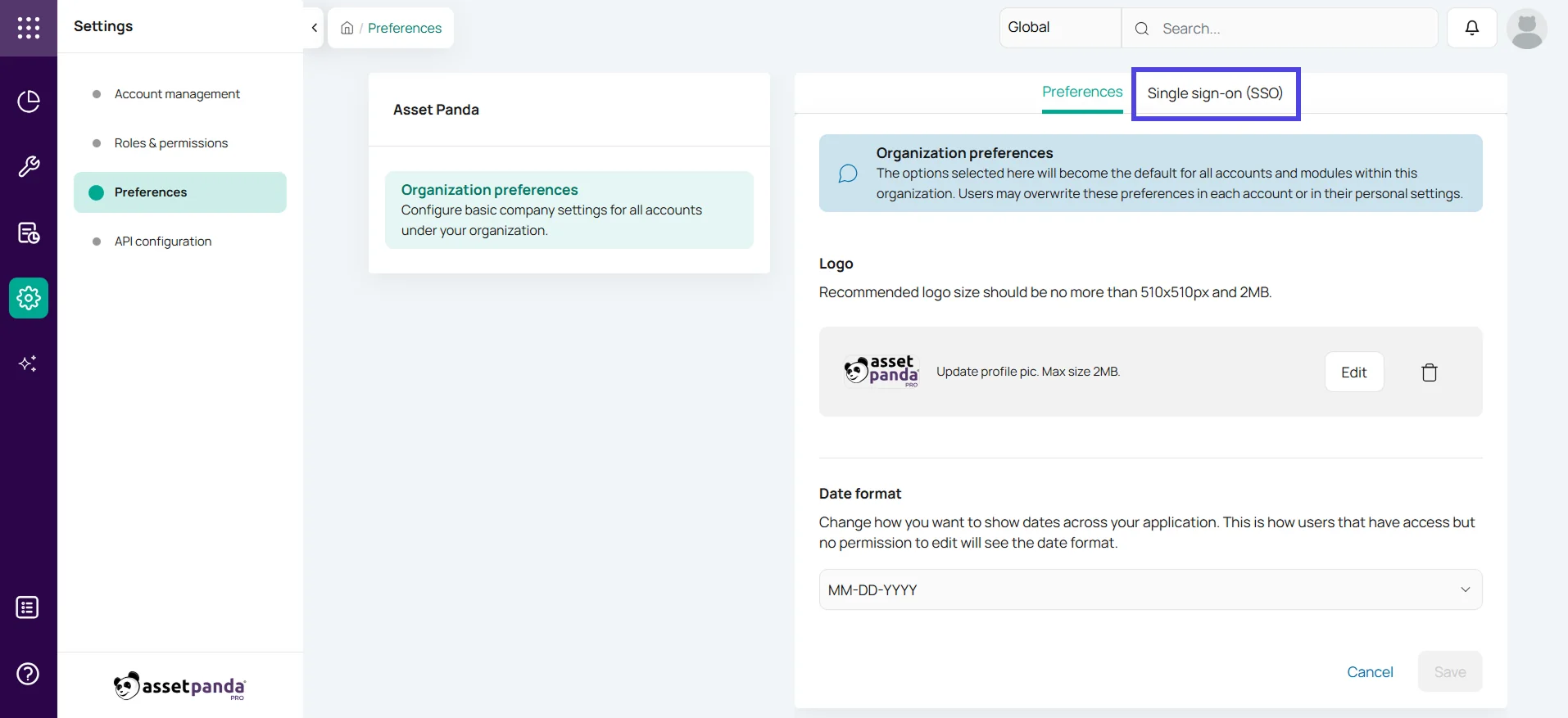
First, under your Settings, select Preferences and then Single Sign-On (SSO) near the top of the screen.
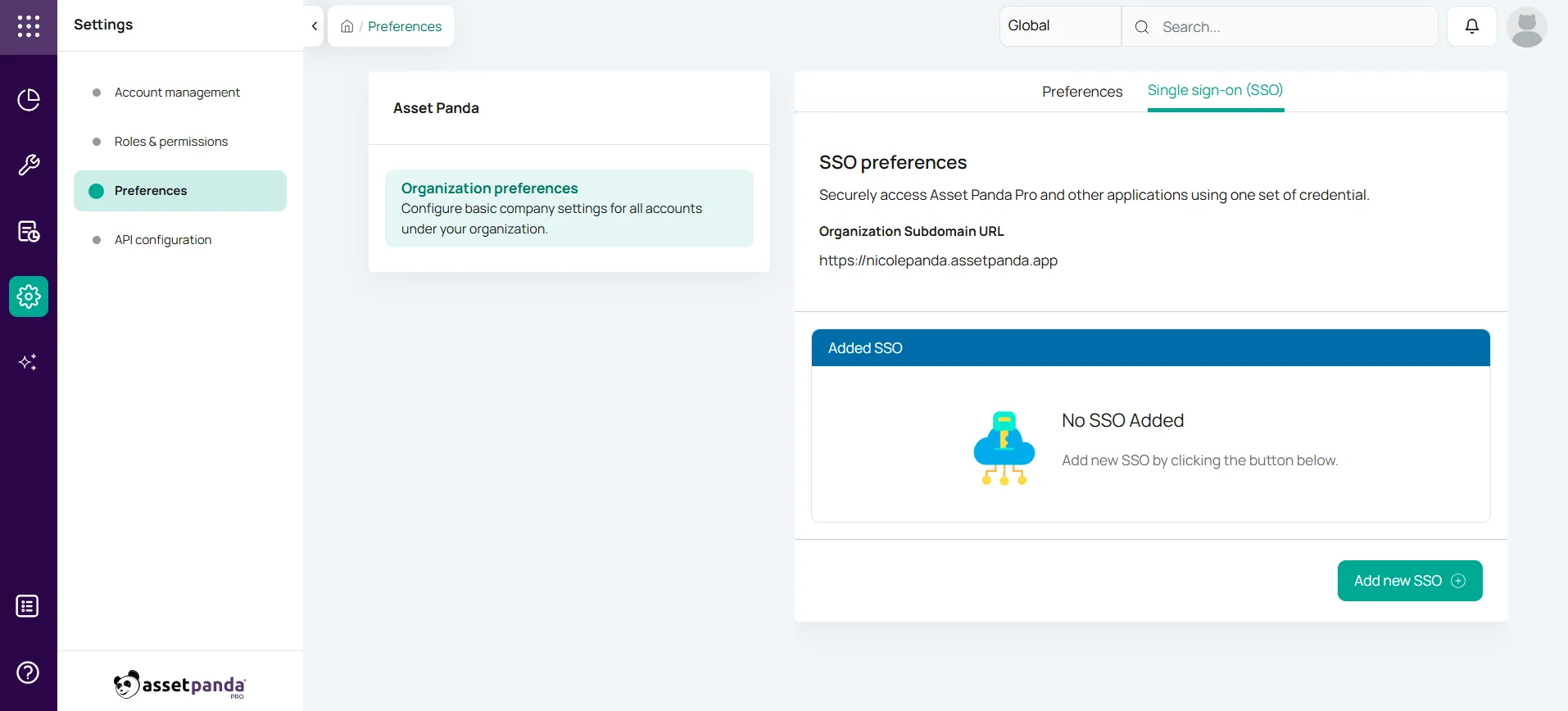
Next, select the Add New SSO button to begin your configuration.
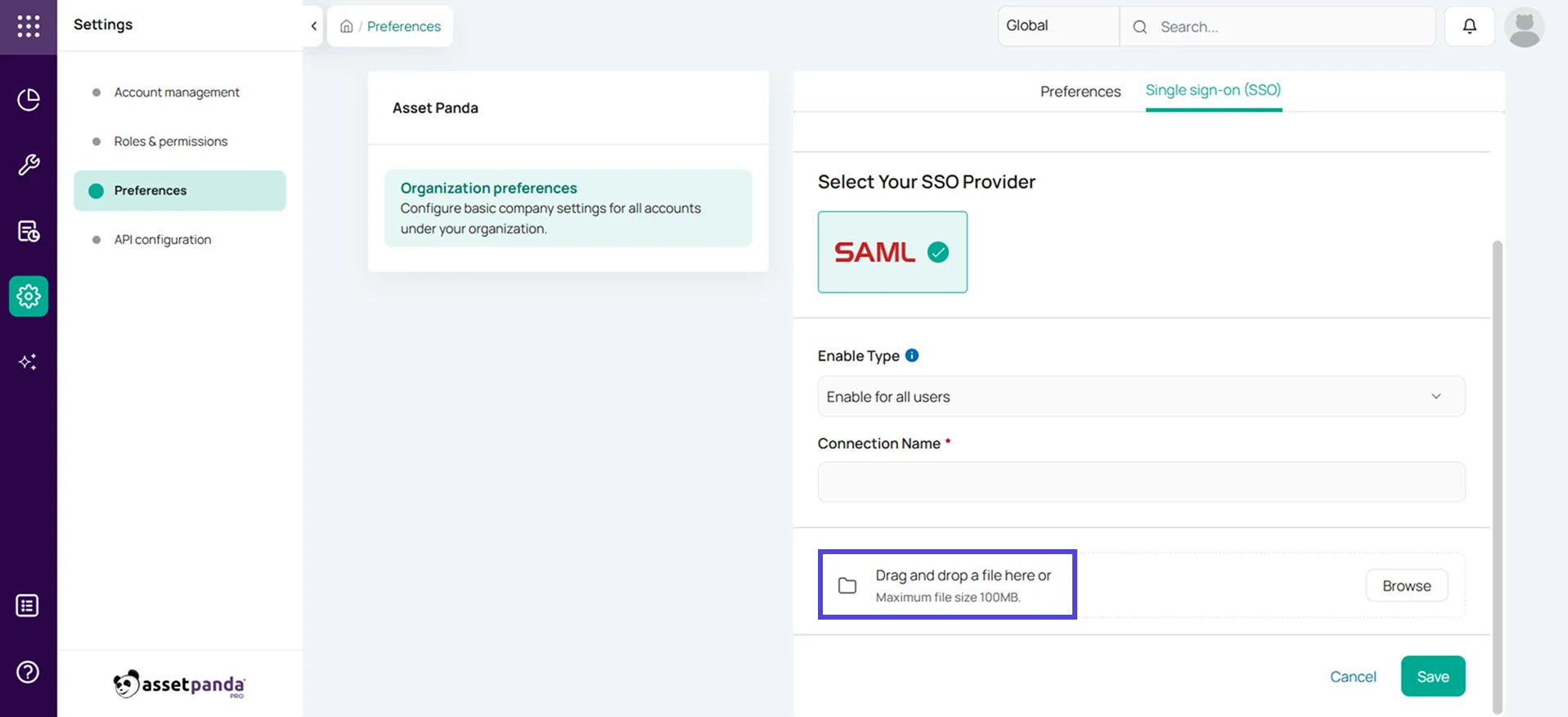
On the next screen, select SAML as your SSO provider, choose your Enable type (if you’re only enabling SSO for select users or all users), name your connection, and upload your SAML certificate/metadata downloaded from your IDP.
2. Integrations
Asset Panda also enables seamless SSO setup through our Okta, Microsoft AD and Entra ID, and Google Workspace integrations. For this example, we’ll walk through the steps to set up Okta from our integrations store.
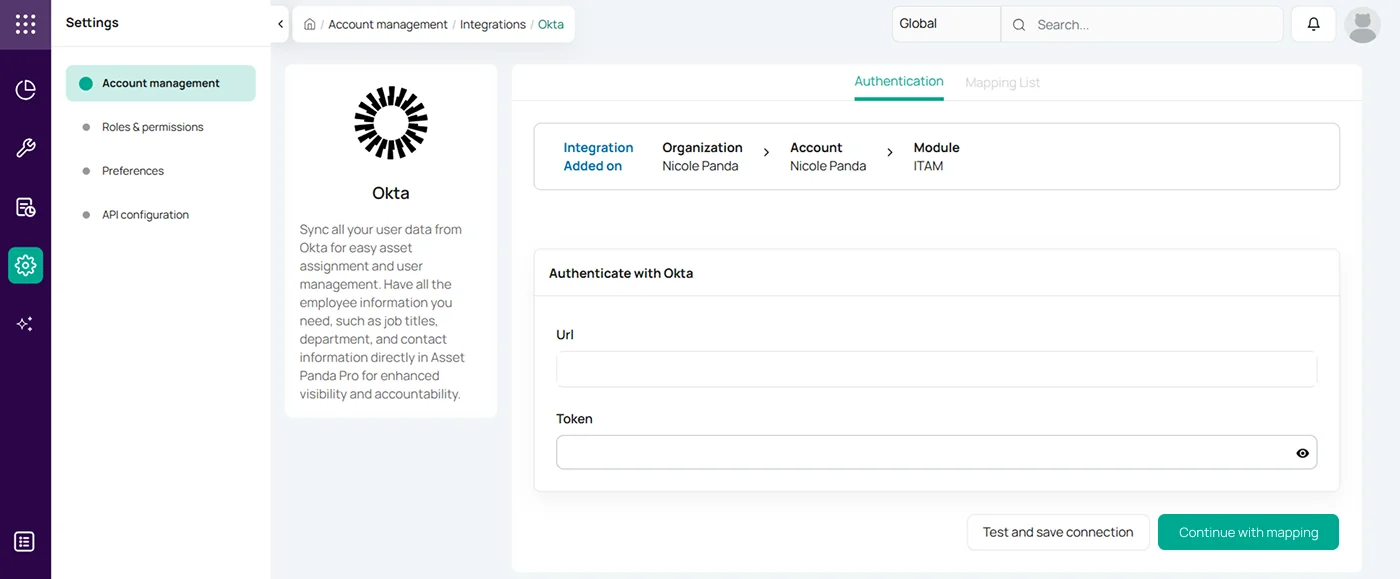
First, toggle to your Settings by clicking the gear icon in the left sidebar. Under Account Management, select Integrations for your chosen module and add the Okta integration (if it’s not added already). Once you’ve added the integration to your module, click Configure.

On the Authentication screen, paste your URL and token generated from the Okta admin console. Select Test and Save Connection next and, if the test passes, click Continue with Mapping to map over your desired fields to complete the configuration.
Building Your Secure Asset Management Program
When SSO login is properly deployed in your organization, it helps your team increase security and boost efficiency. If you’re in search of an asset management platform that can easily connect with your existing SSO provider, look no further than Asset Panda.
Asset Panda’s highly customizable solution can be tailored to match your unique assets and workflows for an intuitive user experience. Our SOC 2-certified platform not only connects with your specific identity provider but also boasts other security measures like TLS 1.2 encryption and robust user roles. With Asset Panda, your organization can securely track assets and save valuable time all while using secure single sign-on functionality.
Take Control of Your Assets
A personalized demo is just one click away.
Related News & Press



Learn more from a solution specialist
Schedule a demo to find out how you can transform your workflows with Asset Panda Pro
Contact our team at (888) 928-6112
