


Inventory Management Software
Focus On Inventory, Not Complexity
We can fit specialized workflows that other platforms either can’t or make far too complicated

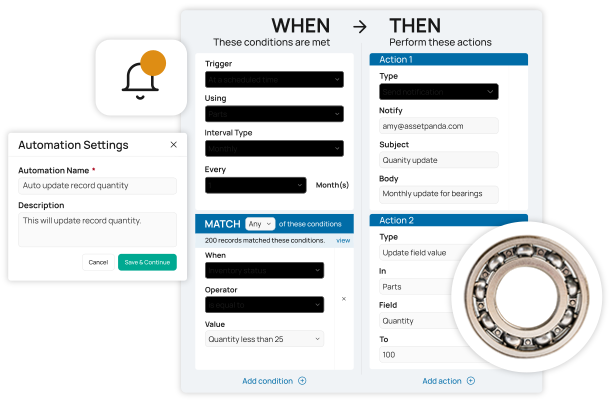
AI Enhanced
Improve your efficiency with the power of Asset Panda Intelligence.

Fast Time to Value
Achieve high user adoption and ROI with our intuitive interface.

Customizable Workflows
Configure the platform to match the way you already work.
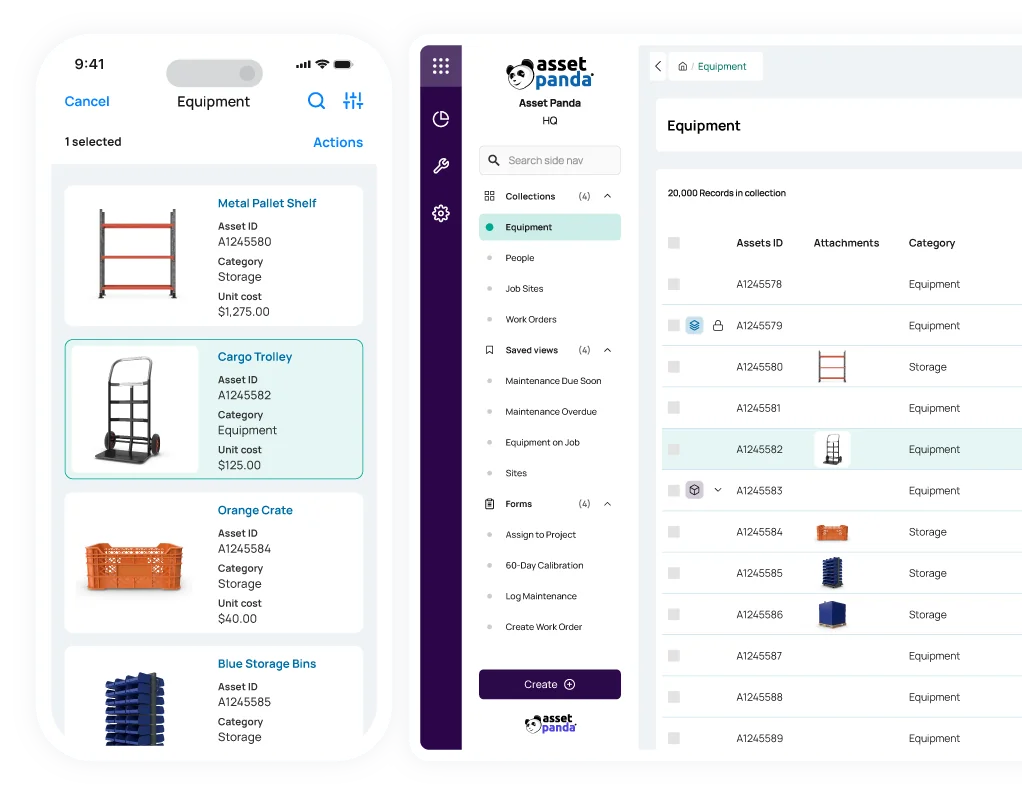
Manage your inventory from anywhere
Track your inventory, spare parts, and more - on the web and on your device
From office supplies to auto parts, our inventory management software allows you to track your stock both on the web and on our mobile app. Our built-in barcode technology helps you:
- Easily check out tools
- Obtain the parts you need
- Conduct audits and inspections
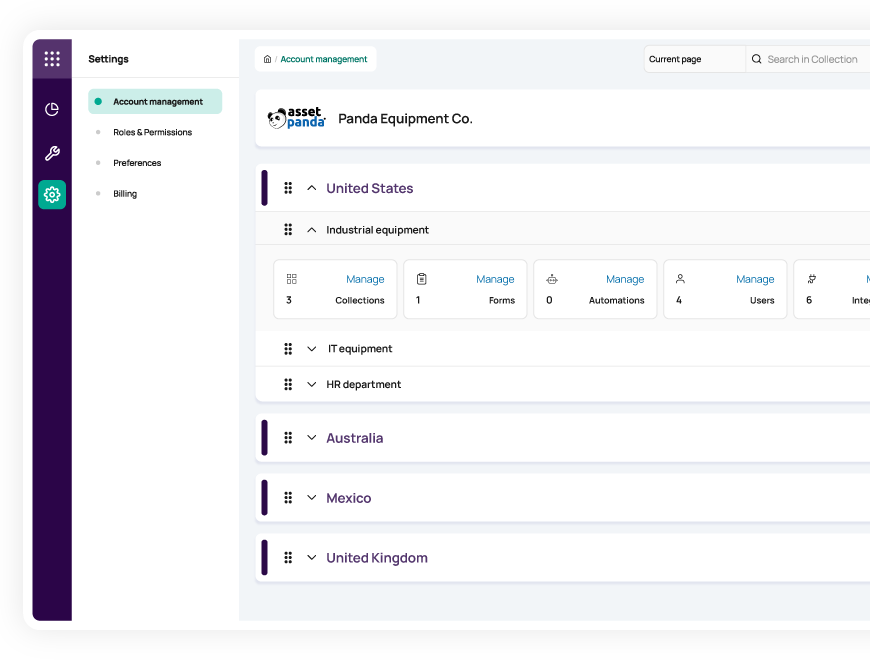
Unify your inventory data
Manage all your inventory items, locations, and employees in one centralized system
Create a single source of truth for all your assets and inventory items with our multi-tenant solution.
- Set up unique accounts for each location or department under one umbrella and
- Assign custom user permissions to ensure the right people have access to the right data
- Increase productivity, accountability, and compliance
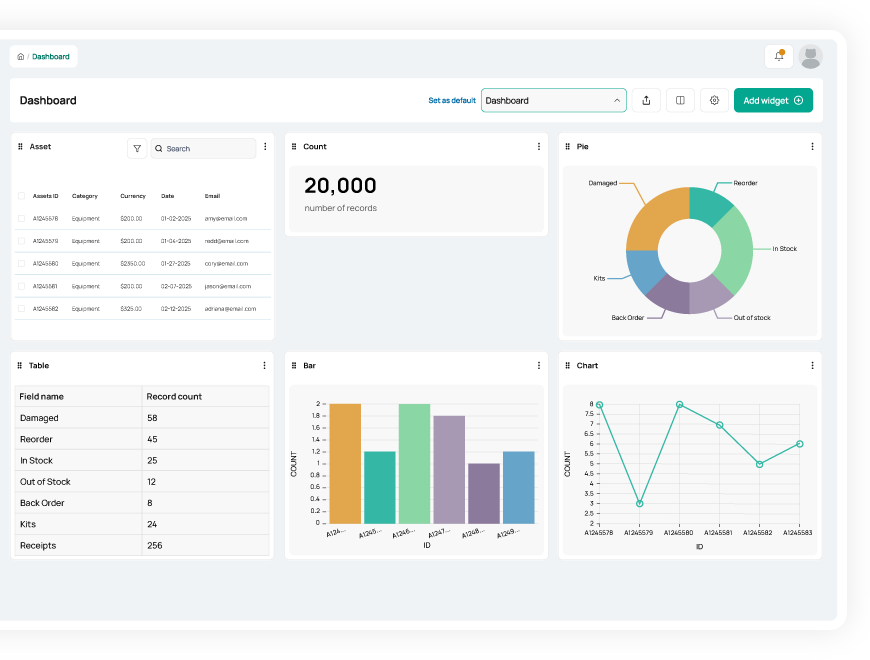
Make more informed decisions
Leverage robust reports and automated alerts to make better data-driven decisions
With customizable reports and alerts in our asset inventory management platform, you can:
- Gain real-time visibility into current stock levels and tool and equipment utilization
- Set up alerts for when inventory levels fall below your chosen threshold
- Better forecast purchasing needs to avoid downtime and overspending
Useful features for inventory management

Asset assignment

Barcode tracking

Multi-account structure

Full lifecycle history

Maintenance tracking

Asset inspection

Repair tracking

Signature capture

Asset kitting

Tool tracking

Record-level attachments

Contract management

Unlimited users

Automations

Robust reports

Action-based forms

Notifications

Custom fields

Field requirements

Asset listing view

iOS and Android Compatible

Offline mode

Full integration with web app

Built-in barcode scanning

GPS pindrop

Mobile actions

Reporting access

Quick asset addition

User specific views

Sortable columns

Global & faceted search

Mobile and web apps

Data import

Easy record replication
Unlimited users

Bulk asset reallocation

Amazon AWS hosting

TLS 1.2 Encryption

Robust roles and permissions

Home Designs eliminates lost inventory problems
“In the past, our inventory management was a manual process, so we had a lot of lost inventory. We didn't have any real way to distinguish what was ours and what didn't belong to us. Now we can without any hesitation.”
Annie Caya
Owner

Hendrix Enterprises manages inventory 5X faster
“We are contractors that are using Asset Panda to track our customer's assets and consumables which were not being tracked at all before we implemented the program. Every single person we have that uses to software absolutely loves it, and we would highly recommend it to anyone looking to track inventory.”
Jayna Hendrix
Project Specialist

Texas Tech eliminates their confusing inventory paper trail
“The mobile app has come in handy when we are away from our desks to keep track of computer assignments in faculty/staff offices. We are also finding it useful to scan barcodes for printer ink to better keep track of what’s being used.”
Paul Terrell
Specialist III
Related inventory resources


Frequently asked questions
How can I set up an automated alert for when a consumable item is low in stock and needs reordering?
Yes. You can create automated low-stock alerts using an Automation that monitors a numeric field such as “Quantity Available.” When the quantity falls below a defined threshold (for example, a Reorder Point field), the automation sends an email or in-app notification to the purchasing manager or stockroom team. This ensures consumable items are replenished on time and never unexpectedly run out.
How do I manage the difference between items returned for disposal versus those returned to stock inventory?
You can manage items returned for disposal versus items returned to stock by using separate Update Forms that change the asset’s Status field. A “Return to Stock” form can update the Status to “Available,” while a dedicated “Disposal” form updates the Status to “Disposed” or “Retired.” By controlling which forms appear based on the asset’s current status, you prevent disposed items from re-entering active inventory and maintain clear separation between usable and end-of-life assets.
How can I ensure accountability when managing inventory where multiple people have access to the stockroom?
Asset Panda enforces accountability in shared stockroom environments through customized check-in/check-out forms and immutable audit logging. Each time inventory is removed or returned, staff submit an Update Form that records who performed the action, when it occurred, and the quantity taken. These updates are logged in the Activity Stream and Form Submission History, creating a clear, verifiable record of inventory movement and user responsibility. Role-based permissions further ensure only authorized users can adjust stock levels.
How do I transition my current inventory management from a "glorified Microsoft Access" or Excel spreadsheet?
You can migrate from Excel or Microsoft Access using Asset Panda’s bulk Data Import tool. After preparing your spreadsheet—cleaning your data and defining a Unique field such as Asset ID or Serial Number—you upload the file and map each column to fields in your collection. The import tool quickly creates your asset records in Asset Panda, making it easy to transition from manual spreadsheets to a centralized, cloud-based system.
Can Asset Panda integrate with our existing inventory systems using an API?
Yes. Asset Panda provides a REST API that allows you to integrate the platform with existing inventory, ERP, or accounting systems. The API supports creating, updating, and retrieving asset records so your development team or integration partner can build bi-directional data flows that keep key information—such as stock levels, status updates, or financial attributes—aligned across systems. All synchronization logic is handled externally through your integration layer, with Asset Panda serving as the central, API-accessible source of asset data.
How does Asset Panda help us maintain accurate inventory records to avoid compliance penalties and stock discrepancies?
Asset Panda improves inventory accuracy through barcode scanning and mobile audits. Barcode scanning eliminates manual entry errors during check-in, check-out, and stock adjustments. The Mobile Audit tool enables fast, routine physical counts by comparing the assets scanned in the field against the assets expected in the system. Any missing or unlisted items are flagged immediately, helping you correct discrepancies early and maintain compliance with internal and regulatory requirements.
Learn more from a solution specialist
Schedule a demo to find out how you can transform your workflows with Asset Panda Pro
Contact our team at (888) 928-6112
