Tool Tracking Software
Every Tool. Every Worker. Every Way.
Connect every asset to every project. Track tools, equipment, and materials across job sites from one single platform

AI Enhanced
Improve your efficiency with the power of Asset Panda Intelligence.

Fast Time to Value
Achieve high user adoption and ROI with our intuitive interface.

Full Lifecycle Management
Track the full history of your tools with comprehensive records and reports.
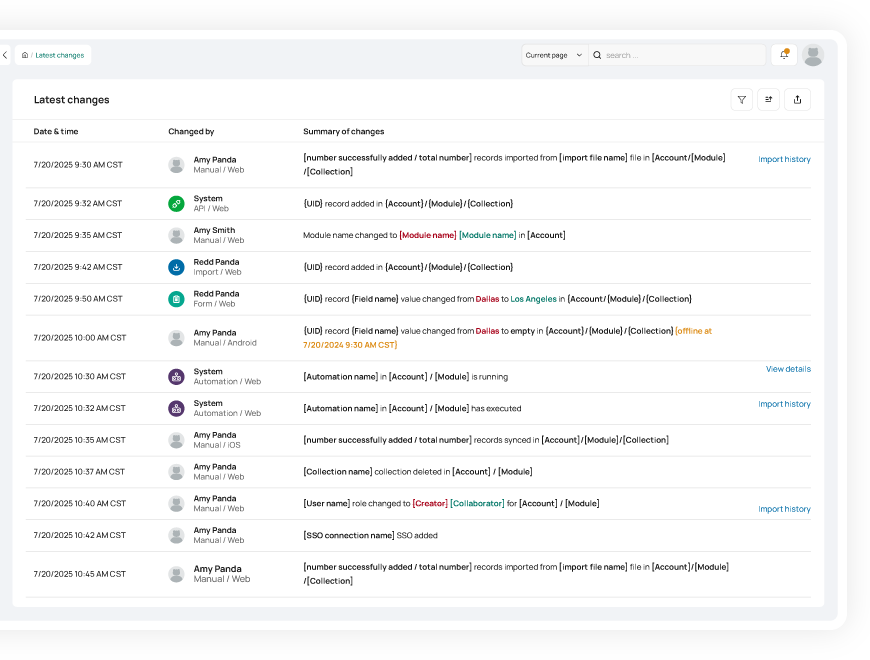
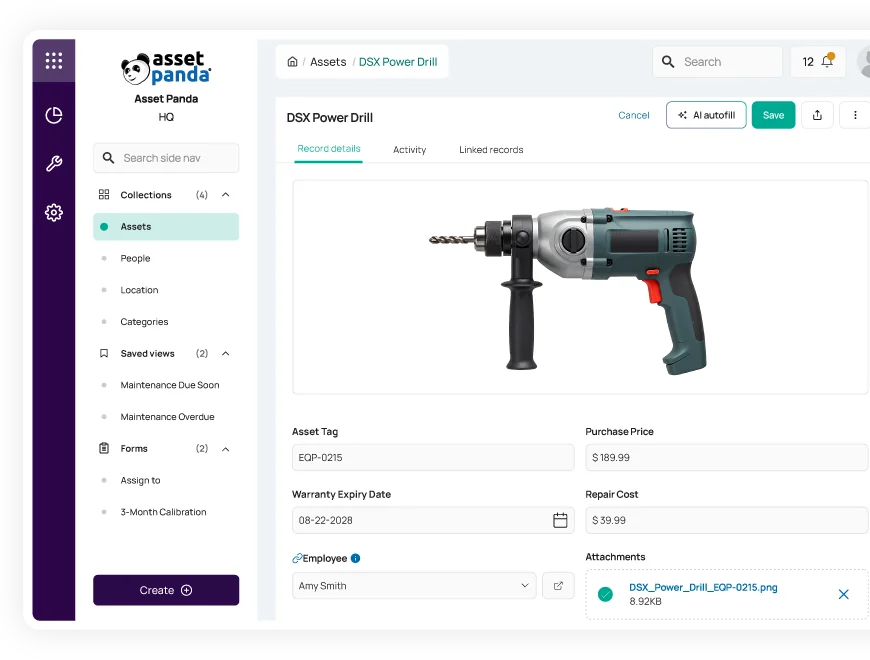
Gain visibility into the lifecycle of your tools
Increase operational efficiency with asset lifecycle management
Get insight into the full history of your tools and assets with our comprehensive tool tracking software.
- Access repair history and warranty information
- Optimize tool utilization and reduce overspending
- Streamline preventive maintenance and avoid downtime
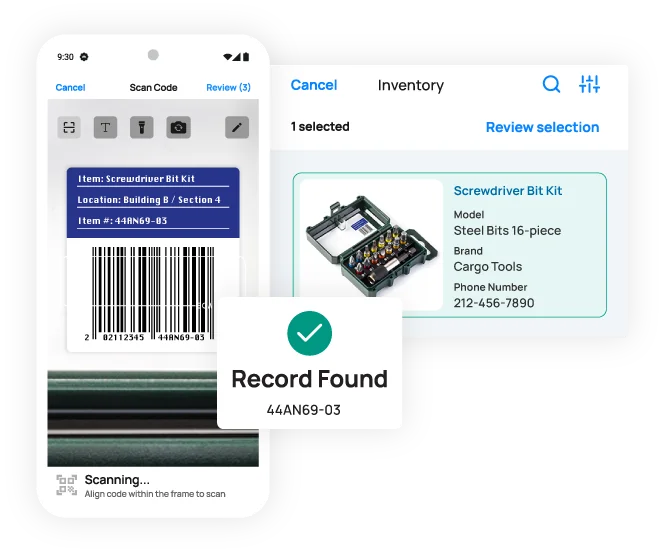
Track tools from anywhere
Easily track and manage tools using our mobile app with built-in barcode technology
Access tool information on the go with our easy-to-use mobile app with available offline mode.
- Pull up records instantly with a single scan
- Check out tools or request repairs directly from the job site
- Generate and print your own barcodes or QR codes
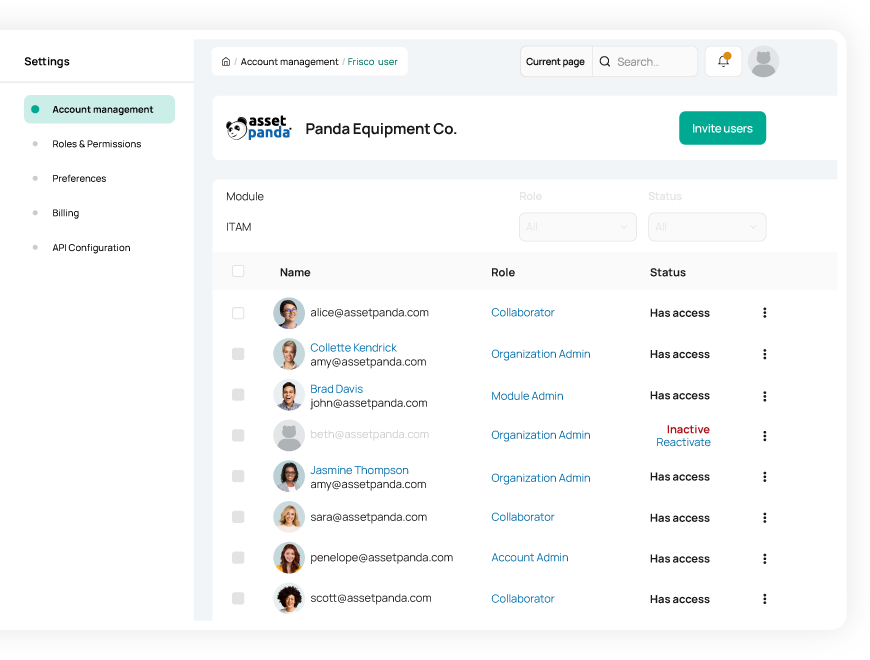
Manage everything in one platform
Create a single source of truth for all your tools, workflows, and employees
Track everything that matters to your business in our highly configurable tool tracking software.
- Manage various types of assets and workflows
- Maintain an updated employee directory for easy tool assignment
- Assign custom user permissions to increase accountability and security
Useful features for tool asset management

Asset assignment

Barcode tracking

Multi-account structure

Full lifecycle history

Maintenance tracking

Asset inspection

Repair tracking

Signature capture

Asset kitting

Tool tracking

Record-level attachments

Contract management

Unlimited users

Automations

Robust reports

Action-based forms

Notifications

Custom fields

Field requirements

Asset listing view

iOS and Android Compatible

Offline mode

Full integration with web app

Built-in barcode scanning

GPS pindrop

Mobile actions

Reporting access

Quick asset addition

User specific views

Sortable columns

Global & faceted search

Mobile and web apps

Data import

Easy record replication
Unlimited users

Bulk asset reallocation

Amazon AWS hosting

TLS 1.2 Encryption

Robust roles and permissions

Improved Visibility for Tools on the Move for Renfro Electric
“Signing out tools is a breeze thanks to Asset Panda’s mobile app. Our field users...can quickly and easily sign tools in and out. There is no more guessing as to where assets are or interrupting phone calls to employees in the middle of their work to see who has what.”
Kyle Adair
PM/Estimator

Enhanced Accountability Saves Track Utilities Hundreds of Hours Each Year
“Since Track Utilities has started using Asset Panda we are now able to keep tools with the appropriate crews and make sure they are returning tools after being used. The ability to keep people accountable and take ownership of the tools they work with has paid for the cost over and over again”
Brian Bruni
Asset Management

Tracerco Gets Better Access and Time Savings
“...Asset Panda has allowed many people to contribute to a system that was once managed manually by one person. I estimate that we're saving three hours a day by using Asset Panda for our asset tracking efforts.”
Justin Tippit
Operations Manager

Mobile Access and Custom Reporting For Ace Avant Concrete Construction Co's Tools
“The customization of the software specifically for our needs is very important. We can pull customized, detailed reports on any piece of equipment in the system from its check in/check out status to a complete maintenance history.”
Ricardo Hernandez
IT Technician
Related tool tracking resources


Frequently asked questions
How do I track lost gym equipment, power tools, or other valuable items where accountability is critical?
Asset Panda helps track and recover high-value items by using barcode scanning and accountable transfer forms. When equipment is issued or returned, users scan the item and submit a check-out or transfer form that updates fields such as Assigned To and Status. Each submission is logged in the Activity Stream with the user who performed the update and the exact timestamp. If an item is later reported lost, the asset record clearly shows the last assigned user and the most recent transaction, providing a verifiable audit trail to determine responsibility and support recovery efforts.
Can Asset Panda help us track the chain of custody for valuable tools when moving between job sites or departments?
Yes. Asset Panda tracks chain of custody by logging every update to key fields such as Location and Assigned To in the immutable Activity Stream. When tools move between job sites or departments, users submit a transfer or check-out form that updates these fields. Each submission records who made the change and when it occurred, creating a continuous, verifiable history of possession and movement for valuable tools.
How can I ensure a user only sees the tools they have personally checked out and not the entire department's inventory?
Yes. Asset Panda can restrict a user to seeing only the tools they have personally checked out by using Limited Record Visibility or User Templates with filters. Administrators configure visibility rules so a user only sees asset records where the “Assigned To” field matches their user account. Role-based permissions then control what actions the user can perform on those records, ensuring they do not see or manage the broader department inventory.
Is it possible to track tool kits as a single unit while still tracking the individual items inside?
Yes. Asset Panda supports this through its Kits feature. A tool kit can be defined as a single kit record (for example, “Field Service Kit #1”) that contains multiple individual assets such as tools or meters. Each item inside the kit retains its own unique ID and history, while the kit allows the entire set to be checked out, audited, or managed together. This provides full visibility into both the kit as a unit and the condition and history of each individual tool.
How does barcode tracking help enforce the process and reduce the manual data entry errors associated with tool logs?
Barcode tracking helps reduce manual data entry errors by eliminating the need to type asset IDs or serial numbers. Instead of manually searching or entering long identifiers, users scan the asset’s barcode to instantly open the correct record before logging a transaction. This significantly reduces typos, speeds up tool logs, and ensures updates are consistently applied to the right asset, improving accuracy and process compliance.
How does Asset Panda enforce strict check-in/check-out procedures to meet safety and accountability requirements?
Asset Panda supports strict check-in/check-out procedures by using custom update forms, required fields, and asset status controls. Administrators can design check-out forms that require safety confirmations or digital signatures before submission, and use status-based form visibility so assets cannot be issued unless they are in an approved state. Each submission is logged in the Activity Stream with the user and timestamp, providing a clear, auditable record that supports safety and accountability requirements.
Learn more from a solution specialist
Schedule a demo to find out how you can transform your workflows with Asset Panda Pro
Contact our team at (888) 928-6112
